This is a small project documenting my first real attempt at writing and deploying Infrastructure as Code (IaC). It's a simple static website, but the focus was on the process of defining all the required cloud resources programmatically.
Lots of yapping ahead, if you want to see how I created IAC for my website, this is the source code.
How I Got Here
Before this, my deployment strategies were different. For simple projects, I'd often use serverless platforms that handle the infrastructure implicitly. For more complex applications, I relied on CI/CD pipelines using tools like GitHub Actions to build and deploy code, but the underlying infrastructure was usually provisioned manually through the cloud console.
I wanted to understand how to manage infrastructure more robustly and repeatably. I started by following the official Hashiorp Terraform Getting Started Guide for GCP. That was enough to get a basic virtual machine running and understand the core concepts of providers and resources.
It led to my initial "hello world" code - a single, lonely VM, but one I could summon and dismiss at will.
# From my starter_code/ directory
provider "google" {
  project = var.project
  region  = var.region
}

resource "google_compute_network" "vpc_network" {
  name = "terraform-network"
}

resource "google_compute_instance" "vm_instance" {
  name         = "terraform-instance"
  machine_type = "f1-micro"

  boot_disk {
    initialize_params {
      image = "cos-cloud/cos-stable"
    }
  }

  network_interface {
    network = google_compute_network.vpc_network.name
    access_config {}
  }
}
What is this about
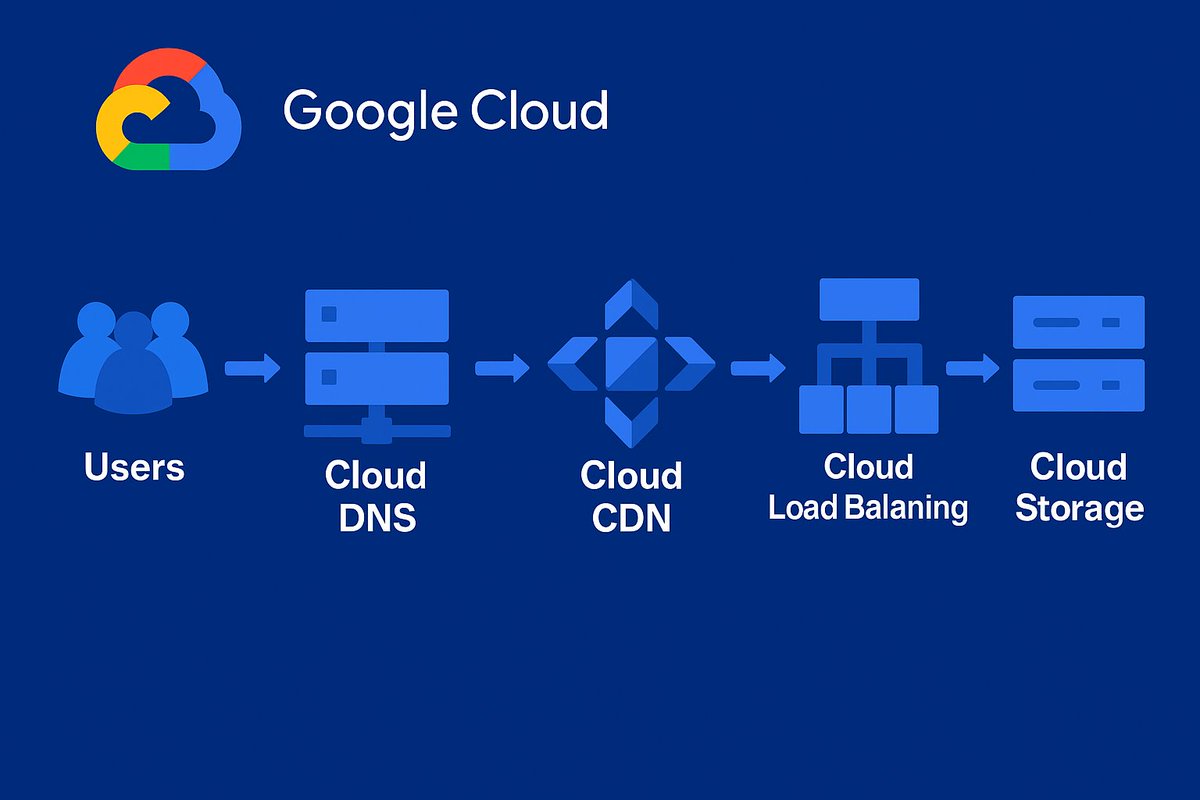
This was not worth the time I put into it, so I created an IaC pipeline to serve a basic static website. The infrastructure is deployed on Google Cloud Platform (GCP) and consists of:
- Google Cloud Storage: A storage bucket to hold the website's
index.htmlfile. - Cloud CDN: To cache the website content and serve it quickly to users globally.
- Global Load Balancer: To direct traffic to the backend, which in this case is the storage bucket.
- Custom Domain: DNS records to point a custom domain to the load balancer.
This setup is defined entirely using Terraform, which allows me to create, modify, and destroy the entire infrastructure with a few commands.
Building the Real (..some)Thing
After getting the basics down, I moved on to this project. The goal was to go beyond a single VM and build a more realistic setup for a (yet another) static website. This involved learning about more GCP resources and how they connect.
Here are a few snippets from the infra/main.tf file that show how the pieces fit together.
First, I defined a storage bucket and uploaded the index.html file to it:
# Create a bucket to store the website files
resource "google_storage_bucket" "landing" {
    name     = var.bucket_name
    location = var.bucket_location
}

# Upload the static page to the bucket
resource "google_storage_bucket_object" "static_page" {
    name   = "index.html"
    source = "./website/index.html"
    bucket = google_storage_bucket.landing.name
}
Next, I set up the CDN and pointed it to the storage bucket. The enable_cdn = true flag is the key part here.
# Add the bucket as a CDN-enabled backend
resource "google_compute_backend_bucket" "landing-backend" {
  name        = "landing-backend"
  description = "Contains files needed by the website"
  bucket_name = google_storage_bucket.landing.name
  enable_cdn  = true
}
Finally, I configured the load balancer and DNS to expose the website to the internet on a custom domain. This was the most complex part, involving a URL map, an HTTPS proxy, and a forwarding rule.
# GCP URL MAP to route requests
resource "google_compute_url_map" "landing" {
  name            = "landing-url-map"
  default_service = google_compute_backend_bucket.landing-backend.self_link
}

# GCP target proxy to terminate SSL
resource "google_compute_target_https_proxy" "landing" {
  name             = "landing-target-proxy"
  url_map          = google_compute_url_map.landing.self_link
  ssl_certificates = [google_compute_managed_ssl_certificate.landing.self_link]
}

# GCP forwarding rule to handle incoming traffic
resource "google_compute_global_forwarding_rule" "default" {
  name                  = "landing-forwarding-rule"
  load_balancing_scheme = "EXTERNAL"
  ip_address            = google_compute_global_address.landing.address
  port_range            = "443"
  target                = google_compute_target_https_proxy.landing.self_link
}
The next Thing
This was a great first step. Writing IaC feels powerful; it's like writing code for your infrastructure. The biggest takeaway is the confidence that I can spin up and tear down this entire setup reliably with just terraform apply and terraform destroy.
I've watched some tutorials on more advanced topics like Terraform modules, managing multiple environments (dev/staging/prod), and automated testing with Terratest. They are still abstractions to me, concepts I haven't yet had to grapple with.
The next challenge is to build something bigger. A full DevOps project, with multiple services, automated workflows, and an IaC structure that can evolve. This project was the perfect foundation for that.
Anyway, I should stop writing and get back to work. Another unfinished PR just hit my inbox.